Sunday's sermon, in every language your church speaks.
Send in the recording and get back the sermon's own page — a narrated recap video, audio, outline, and transcript in each language — published the same afternoon, with one OK from you along the way.
A name and your languages — that's the whole setup. No card, no install.
One recording, published in every language your church speaks — and we're adding more all the time.
What one upload becomes
Every member gets the sermon in a language they think in.
Live translation fixes Sunday, in the room. But the family who missed it and the visitor who found you online get a recording in one language. One upload turns it into a page anyone can open — watched, heard, and read in their own.
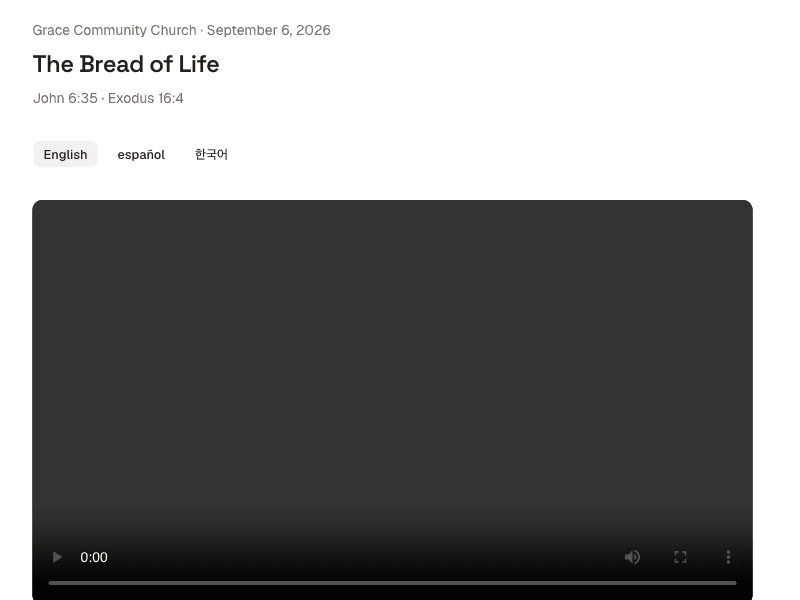
A recap video in every language
The sermon retold by a natural narrator voice — the message distilled, the worship music left out.
Audio on its own
The same narration as plain audio, for the drive home or the member who only listens.
A plain-language outline
The sermon's arc in a few clear points, with the scripture it stood on — easy to follow, easy to come back to.
A word-for-word transcript
Every spoken word with timestamps, in each language your church publishes.
How it works
From one recording to a published, multilingual sermon page.
- 1
Send the recording in
Sunday's video or audio, straight from a phone — or paste a link to it.
- 2
We retell it in each language
The sermon is distilled into a recap, translated, and read by a natural narrator voice — usually ready in an hour or two.
- 3
You OK the outline
Before anything is voiced, the sermon's outline is on screen — keep it, or leave parts out.
- 4
Everyone gets one link
It publishes itself: the sermon's own page — video, audio, outline, and transcript — in every language.
The turnaround
Upload after the service. Publish the same afternoon.
Most sermons are published within an hour or two. No editing suite, no translator to book, no volunteer's week gone — one upload, and it's out before the midweek meeting.
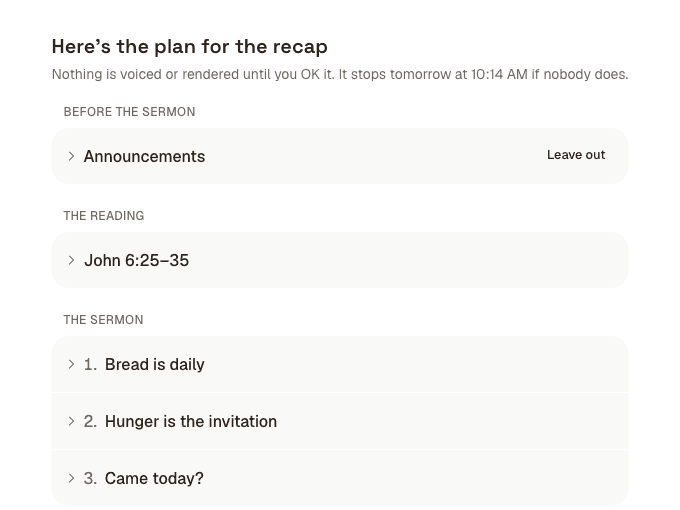
You stay in control
Nothing is voiced until you have seen the outline.
Before a word is translated or narrated, the sermon's outline is on your screen. Keep it, leave a point out, or attach a clip to one — then press OK and the rest happens on its own. One look from a person, no inbox to chase.
What about the worship music?
It never goes up. The published recap retells only the spoken parts of the service — copyrighted songs stay out by construction, not by careful editing.
Do you need the pastor's voice?
No. A natural narrator voice reads the translation. Nothing to record, no consent forms to chase.
Which languages can we publish?
Any your church needs — you pick them at setup and can change them any time. The narrator speaks dozens of languages today.
Publish your next sermon in every language your church speaks.
Set up your church →A name and your languages — that's the whole setup. No card, no install.